Relationship Risk Configuration
Relationship Risk lets you control exactly when FunnelStory flags an account for coverage gaps or conversation drop-off. Admins can tune two independent risk models — Single-Threaded Risk and Engagement Drop — and retrigger the analysis at any time.
Navigate to Configuration → Features → Relationship Map to open the configuration page.
Saving and retriggering
- Save Configuration — persists any threshold changes. Updated thresholds apply the next time the analysis runs or is manually retriggered.
- Retrigger Analysis — reruns the relationship risk computation immediately against all accounts using the current configuration. Use this after saving changes to see results right away.
Single-Threaded Risk
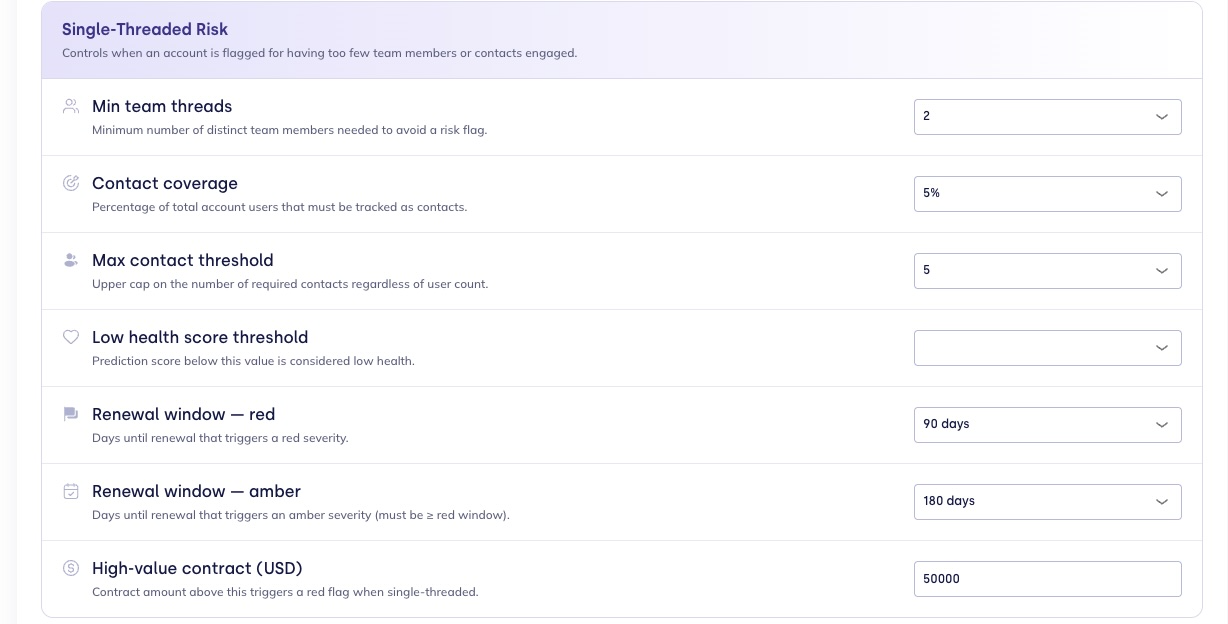
Controls when an account is flagged for having too few team members or contacts engaged.
| Setting | Description | Default |
|---|---|---|
| Risk scope | Evaluate both vendor team and customer contacts, or customer contacts only. | Both sides |
| Lookback window | Days of engagement history used to measure active contacts and team members. | 90 days |
| Min conversations for risk | Accounts with fewer conversations in the lookback window are not flagged. | 1 |
| Min team threads | Minimum number of distinct team members who must have recent conversations to avoid a risk flag. | 2 |
| Contact coverage | Percentage of the account's total tracked users that must be covered as contacts. | 5% |
| Max contact threshold | Upper cap on required contacts, regardless of user count. Prevents unrealistic coverage requirements for very large accounts. | 5 |
| Low health score threshold | Prediction score below this value is considered low health. Accounts below this threshold with single-threaded coverage are escalated to a higher severity. | — |
| Renewal window — red | Days until renewal that triggers a red severity flag. | 90 days |
| Renewal window — amber | Days until renewal that triggers an amber severity flag. Must be greater than or equal to the red window. | 180 days |
| High-value contract (USD) | Contract amount above which a single-threaded account is automatically flagged red, regardless of other thresholds. | $50,000 |
How severity is determined
Only accounts with at least Min conversations for risk conversations in the Lookback window are evaluated — quieter accounts are skipped rather than flagged. Within that window, an account is flagged Single-Threaded when it has fewer active team members than Min team threads or fewer tracked contacts than the coverage requirement — measuring only the side(s) set in Risk scope (both vendor team and customer contacts, or customer contacts only). Once flagged, severity escalates to red when any of the following apply:
- The renewal date falls within the Renewal window — red window.
- The contract value exceeds the High-value contract threshold.
- The health score is below the Low health score threshold.
Otherwise the flag is amber.
Engagement Drop
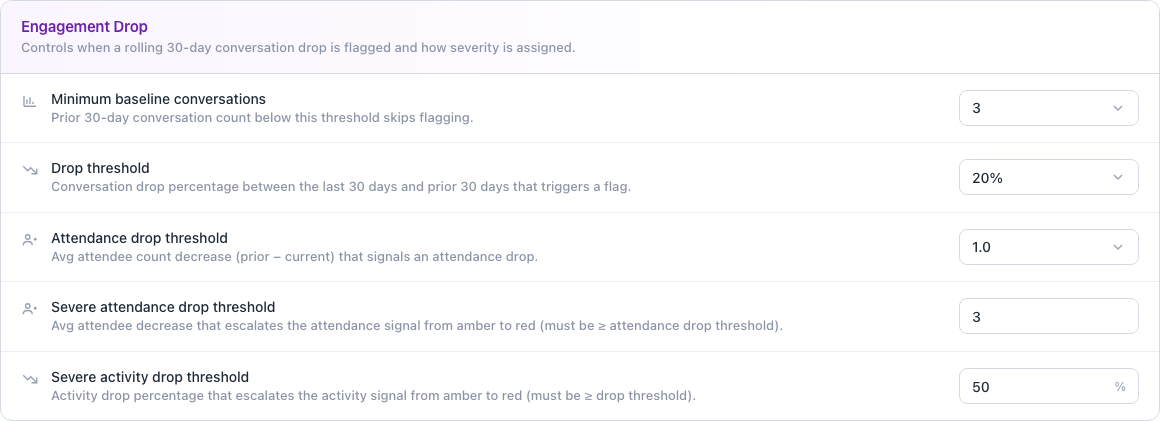
Controls when a month-over-month drop in conversation volume is flagged, and how severity is assigned.
| Setting | Description | Default |
|---|---|---|
| Minimum baseline conversations | Prior 30-day conversation count below this threshold skips flagging entirely. | 3 |
| Drop threshold | Conversation drop percentage (last 30 days vs. the prior 30) that triggers a flag. | 20% |
| Severe activity drop threshold | Conversation drop percentage above which the volume signal alone escalates to red. | 50% |
| Attendance drop threshold | Avg attendee count decrease (prior − current) that signals an attendance drop. | 1 |
| Severe attendance drop threshold | Attendee count decrease above which the attendance signal alone escalates to red. | 3 |
How severity is determined
FunnelStory compares each account's last 30 days of conversations to the prior 30. When the prior window meets the Minimum baseline conversations, two signals are scored independently — conversation volume and attendance — and the account's overall severity is the worst of the two:
- Volume and attendance each use two thresholds to form three tiers: at or below the drop threshold, the signal is green; above the drop threshold but at or below the severe threshold, it's amber; above the severe threshold, it's red.
- Went dark — zero conversations in the current 30 days — is always red outright.
The two signals are then merged into one severity:
| Signal scores | Overall severity |
|---|---|
| Any signal is red | Red |
| Two or more signals are amber | Red |
| Exactly one signal is amber | Amber |
| All signals are green | Green |
Needle Mover Projection
Controls when Single-Threaded Risk and Engagement Drop flags turn into Needle Movers, and how long inactive ones persist before FunnelStory closes them automatically.
| Setting | Description | Default |
|---|---|---|
| New account grace period | Accounts younger than this many days are excluded from relationship-risk needle movers, so a brand-new relationship isn't flagged before it's had a chance to build coverage. | 90 days |
| Inactivity decay | An open relationship-risk needle mover with no updates for this many days is automatically resolved as a backstop, keeping the queue focused on current risk. | 60 days |
Related
- Account Dossier — surfaces these same Single-Threaded Risk and Engagement Drop signals inline on each account, alongside per-contact activity.
- Revenue Review — where Single-Threaded Risk and Engagement Drop flags surface in the account table.
- Relationship Maps — per-account visualization of team and contact coverage.
- Needle Movers — how these flags become Single-Threaded Relationship and Relationship Drop needle movers.
- Predictions Overview — health scores that feed into risk severity calculations.