Account Dossier
The Dossier is an AI-maintained brief for an account — who the stakeholders are, what's currently concerning or encouraging about the relationship, and the durable facts that don't change week to week — built from the account's conversations, notes, and meeting transcripts. Open an account, go to its Renewal tab, then choose Dossier from the sub-tabs (alongside Driving Factors and What's Next (or Cohorts)) when you need to get oriented fast, ahead of a QBR, a renewal call, or a handoff, without digging back through months of history yourself.
What you see
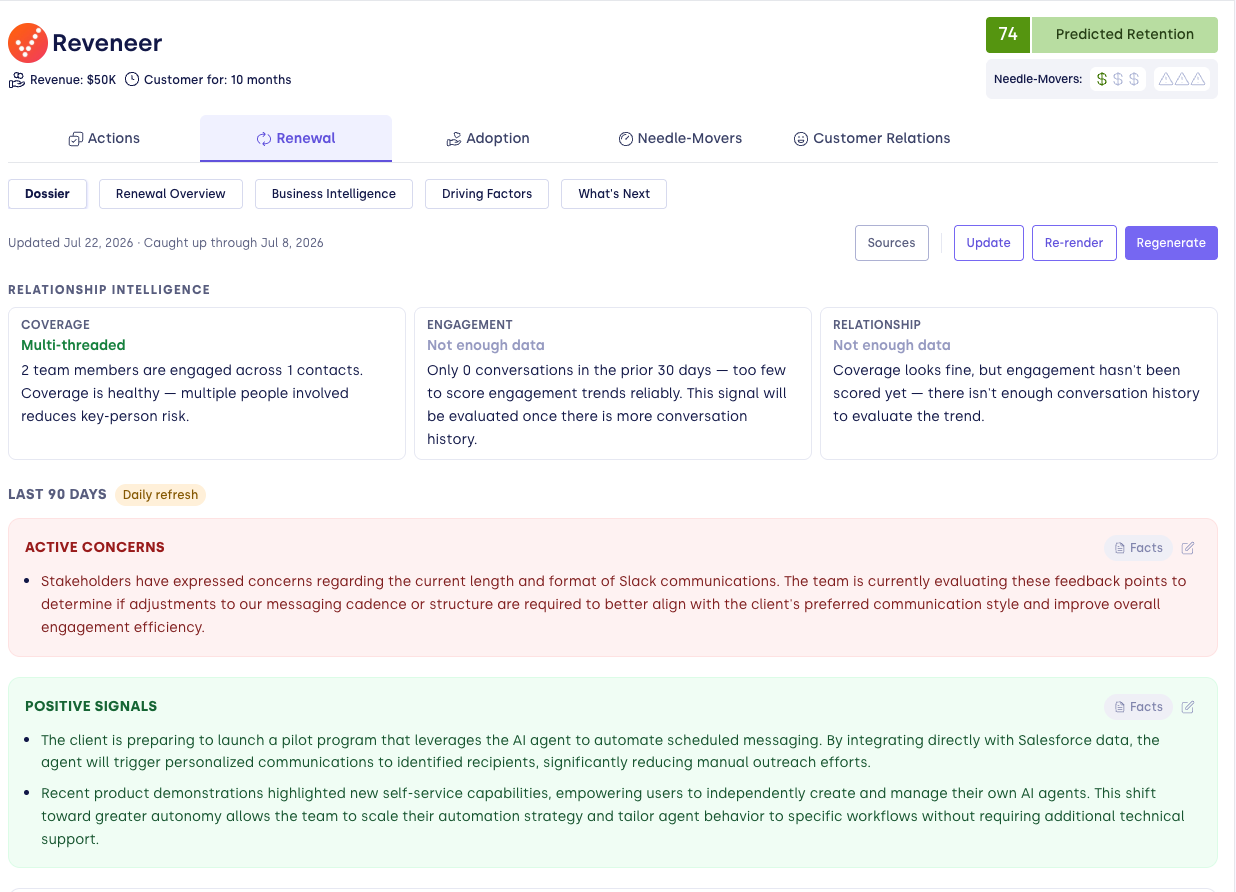
Relationship Intelligence
A summary panel with Coverage, Engagement, and Relationship scores, plus any active risk flags. This reuses the same Single-Threaded Risk and Engagement Drop models configured for your workspace, surfaced inline on the account.
Last 90 Days
A daily-refreshed narrative of recent account activity:
- Active Concerns and Positive Signals — what's currently working against or in favor of the relationship.
- Use Cases — how the account is using your product, based on recent conversations.
- Key Topics This Period — the recurring subjects that came up.
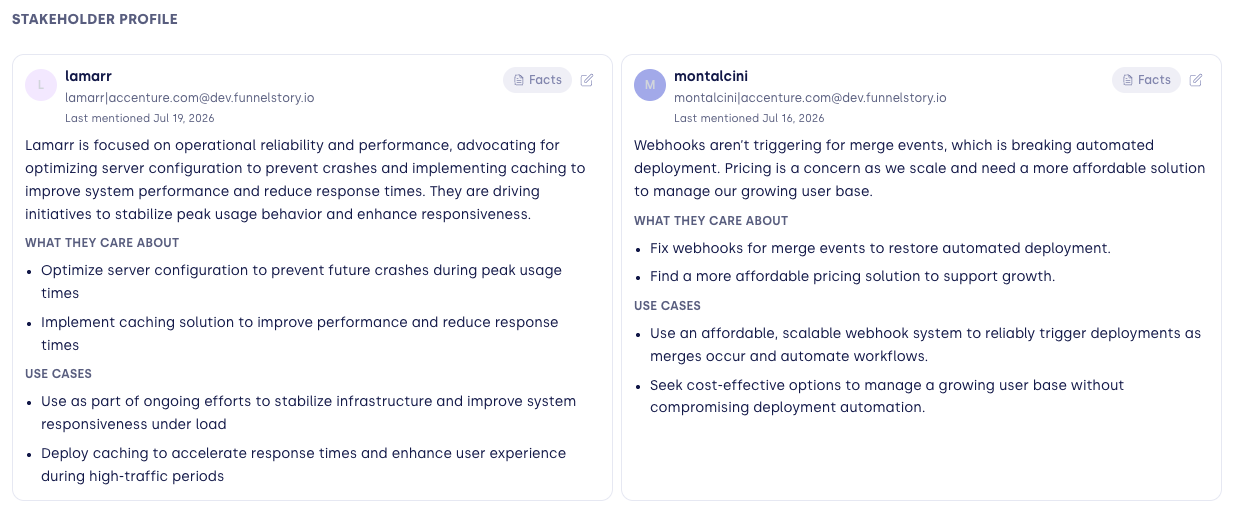
- Stakeholder profile — a card for each contact, showing their role (for example Champion, Economic Buyer, Technical Champion, Executive Sponsor, Power User, Blocker, or Influencer), an activity badge (Active, Flat, or Dark), what they care about, and Contact Activity — which of your team members engage them, how often, and through which channels. A contact goes Quiet when they haven't come up in 90 days, and can be manually Frozen to lock a card in place.
Long-Term Intelligence
Below the 90-day view, a Summary and Use Cases that persist across longer stretches of time — durable context that stays even after the specific conversations that surfaced it age out of the 90-day window.
If nothing long-term has been captured yet, the section shows No long-term intelligence is available for this account yet.
Facts and sources
Every fact behind a section or stakeholder card traces back to where it came from. Click a section's Facts button to open the facts drawer: each fact links to its source conversation or note, and you can pin a fact to keep it even if the AI would otherwise replace it, or dismiss one that's no longer relevant. The toolbar's Sources button opens a separate drawer listing every conversation and note considered for the Dossier — filterable to All, Used, or Not used — so you can audit what was and wasn't included.
In the Sources drawer, a participant marked Attendee is on the account's contact roster because they attended, but no details from that source have been cited on their profile yet.
Keeping it current
A refresh toolbar at the top of the tab shows when the Dossier was last updated. Its Refresh menu offers three options:
- Update — folds in new activity since the last update, keeping existing facts.
- Re-render — rewrites the write-up from existing facts, without analyzing any new activity.
- Regenerate — rebuilds the entire Dossier from scratch. Because this removes the current AI-generated Dossier, you're asked to confirm first, and the Dossier may be unavailable until regeneration finishes. Facts you've pinned, dismissed, or added yourself are kept.
While a refresh is running, a progress indicator and a live feed of newly extracted facts appear, and the existing write-up stays visible with a note that it may still change.
FunnelStory also refreshes Dossiers automatically on a regular cycle, so they stay current even if nobody runs an update. The automatic cycle covers only top-level accounts that haven't churned: churned accounts keep their existing Dossier but stop refreshing, and child accounts in an account hierarchy aren't refreshed automatically — the Dossier is built for the parent account, so child accounts don't show the Dossier sub-tab.
Turning it on
The Dossier sub-tab is enabled per workspace by FunnelStory — there's no self-serve toggle. If you don't see Dossier under a top-level account's Renewal tab, ask your FunnelStory contact to turn it on.
Historical bootstrap
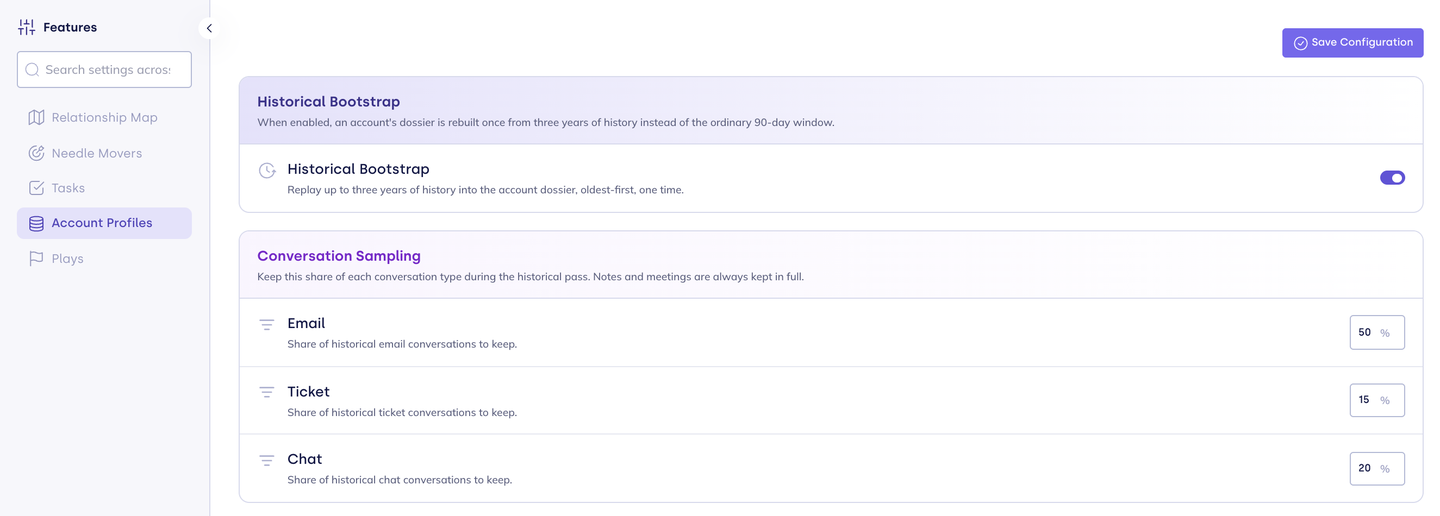
By default, a Dossier is built from the last 90 days of activity. Historical bootstrap lets FunnelStory build each account's Dossier once from up to three years of history instead, so long-running relationships start with their older context already captured. Admins configure it under Configure → Features → Account Profiles.
| Setting | What it does | Default |
|---|---|---|
| Historical Bootstrap | Replays up to three years of history into each account's Dossier, oldest first, one time per account. | Off |
| Email, Ticket, Chat (under Conversation Sampling) | The percentage (0–100) of each conversation type kept during the historical pass. Appears only while Historical Bootstrap is on. | Email 50%, Ticket 15%, Chat 20% |
Notes and meetings are always kept in full; sampling applies only to email, ticket, and chat conversations. Leave a sampling field blank to keep all conversations of that type. The historical pass runs as part of the automatic refresh cycle; after it completes, the Dossier goes back to its usual 90-day updates. Refreshing from the Dossier toolbar (Update, Re-render, or Regenerate) always uses the usual window and doesn't trigger the three-year pass.
Related
- Relationship Risk Configuration — the thresholds behind the Relationship Intelligence panel.
- Relationship Maps — the full team-to-contact visualization behind Contact Activity.
- Needle Movers — the signal feed that Active Concerns and Positive Signals often echo.
- Predictions overview — health scores that feed into relationship risk severity.
- Focus Areas — expanding an account in Book of Business shows its Dossier's active concerns.