Relationship Risk Configuration
Relationship Risk lets you control exactly when FunnelStory flags an account for coverage gaps or conversation drop-off. Admins can tune two independent risk models — Single-Threaded Risk and Engagement Drop — and retrigger the analysis at any time.
Navigate to Configuration → Features → Relationship Map to open the configuration page.
Saving and retriggering
- Save Configuration — persists any threshold changes. Updated thresholds apply the next time the analysis runs or is manually retriggered. Shared thread owner is the exception: it only takes effect for past weeks after a retrigger (see Needle Mover Projection).
- Retrigger Analysis — reruns the relationship risk computation immediately against all accounts using the current configuration. Use this after saving changes to see results right away. It rebuilds each account's stored relationship history over the full span the risk analysis reads, so it can also make accounts assessable that were previously shown as not assessed (see below).
Evaluation windows and history
Risk is scored on whole UTC days, ending with the last complete day — today's partial activity is picked up the next day. The Single-Threaded Risk Lookback window and the two 30-day Engagement Drop windows all end on that day, and the current and prior Engagement Drop windows never overlap. The Account Dossier and Revenue Review show the actual date ranges that were scored.
Scoring reads only the relationship history FunnelStory has stored for each account, and needs that history for the whole span it evaluates. An account without enough stored history isn't assessed: it shows No data or Not enough data rather than a healthy status, and FunnelStory neither opens nor resolves relationship-risk needle movers for it until enough history exists. A missing history is treated as unknown, never as a sign the account is fine.
Only conversations the customer took part in count toward these signals — an email your team sent doesn't count as engagement. See What counts as engagement.
Single-Threaded Risk
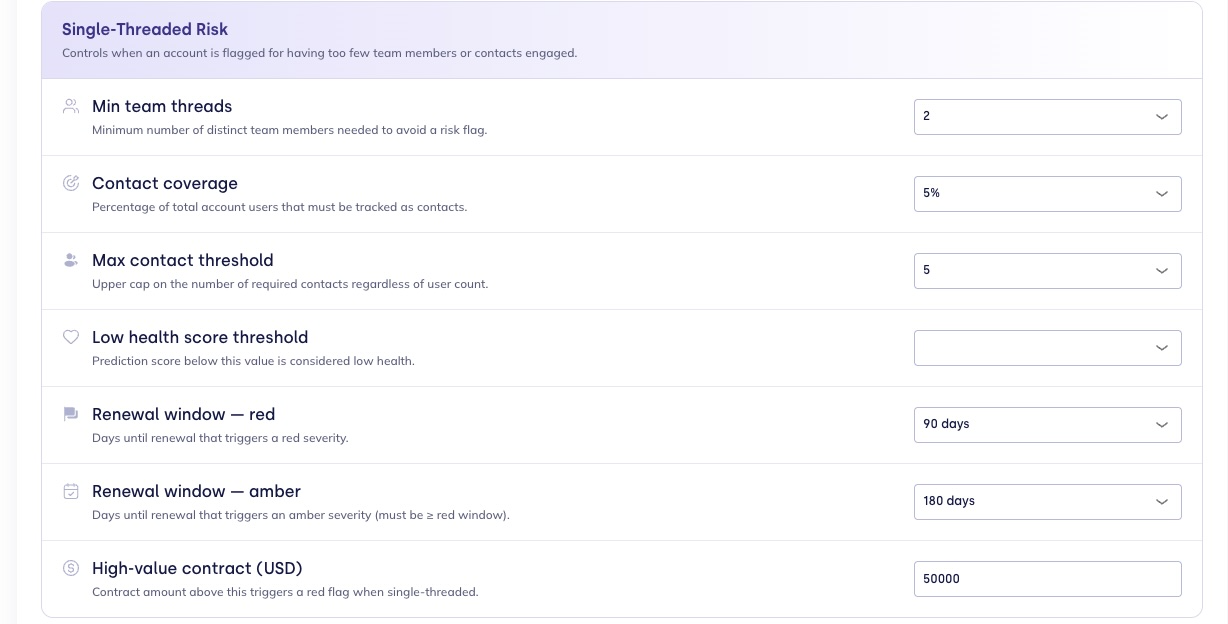
Controls when an account is flagged for having too few team members or contacts engaged.
| Setting | Description | Default |
|---|---|---|
| Risk scope | Evaluate both vendor team and customer contacts, or customer contacts only. | Both sides |
| Lookback window | Days of engagement history used to measure active contacts and team members. | 90 days |
| Min conversations for risk | Accounts with fewer conversations in the lookback window are not flagged. | 1 |
| Min team threads | Minimum number of distinct team members who must have recent conversations to avoid a risk flag. | 2 |
| Contact coverage | Percentage of the account's total tracked users that must be covered as contacts. | 5% |
| Max contact threshold | Upper cap on required contacts, regardless of user count. Prevents unrealistic coverage requirements for very large accounts. | 5 |
| Low health score threshold | Prediction score below this value is considered low health. Accounts below this threshold with single-threaded coverage are escalated to a higher severity. | 0.70 |
| Renewal window — red | Days until renewal that triggers a red severity flag. | 90 days |
| Renewal window — amber | Days until renewal that triggers an amber severity flag. Must be greater than or equal to the red window. | 180 days |
| High-value contract (USD) | Contract amount above which a single-threaded account is automatically flagged red, regardless of other thresholds. | $50,000 |
How severity is determined
Only accounts with at least Min conversations for risk conversations in the Lookback window are evaluated — quieter accounts are skipped rather than flagged. Within that window, an account is flagged Single-Threaded when it has fewer active team members than Min team threads or fewer tracked contacts than the coverage requirement — measuring only the side(s) set in Risk scope (both vendor team and customer contacts, or customer contacts only). Once flagged, severity depends on how thin the coverage is and what's at stake. An account is single-threaded when at most one team member or at most one customer contact is engaged. A single-threaded account escalates to red when any of the following apply:
- The renewal date falls within the Renewal window — red window.
- The contract value exceeds the High-value contract threshold.
- The health score is below the Low health score threshold.
- The account's predicted outcome is churn.
The flag is amber when the account is single-threaded without any of those, or when it's more thinly covered than your targets and the renewal falls within the Renewal window — amber window. Any other flagged account — below target but with more than one person engaged on each side, and no renewal coming up — is green.
With Risk scope set to customer contacts only, severity isn't escalated: an account with no engaged contacts is red, and one with too few contacts is green.
Engagement Drop
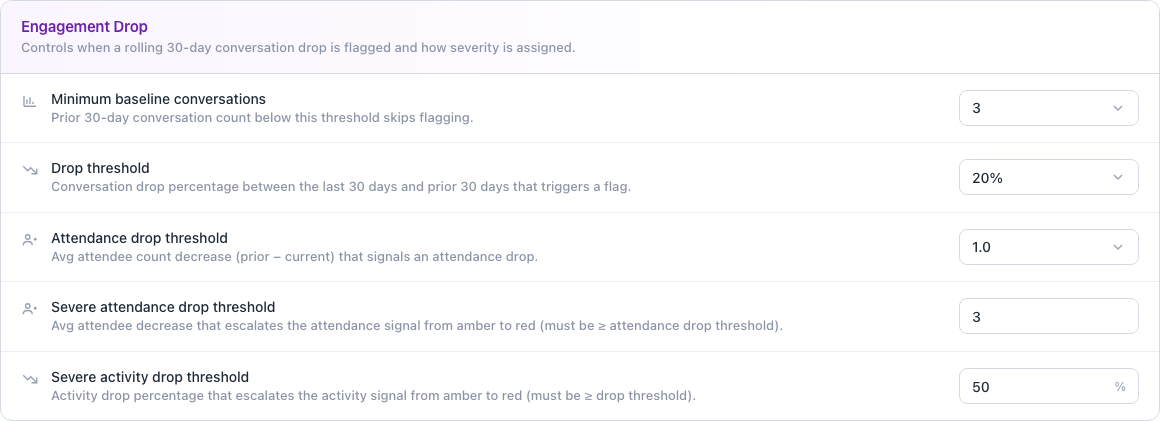
Controls when a month-over-month drop in conversation volume is flagged, and how severity is assigned.
| Setting | Description | Default |
|---|---|---|
| Minimum baseline conversations | Prior 30-day conversation count below this threshold skips flagging entirely. | 3 |
| Drop threshold | Conversation drop percentage (last 30 days vs. the prior 30) that triggers a flag. | 20% |
| Severe activity drop threshold | Conversation drop percentage above which the volume signal alone escalates to red. | 50% |
| Attendance drop threshold | Avg attendee count decrease (prior − current) that signals an attendance drop. | 1 |
| Severe attendance drop threshold | Attendee count decrease above which the attendance signal alone escalates to red. | 3 |
How severity is determined
FunnelStory compares each account's last 30 days of conversations to the prior 30. When the prior window meets the Minimum baseline conversations, two signals are scored independently — conversation volume and attendance — and the account's overall severity is the worst of the two:
- Volume and attendance each use two thresholds to form three tiers: at or below the drop threshold, the signal is green; above the drop threshold but at or below the severe threshold, it's amber; above the severe threshold, it's red.
- Went dark — zero conversations in the current 30 days — is always red outright.
The two signals are then merged into one severity:
| Signal scores | Overall severity |
|---|---|
| Any signal is red | Red |
| Two or more signals are amber | Red |
| Exactly one signal is amber | Amber |
| All signals are green | Green |
Needle Mover Projection
Controls when Single-Threaded Risk and Engagement Drop flags turn into Needle Movers.
A Single-Threaded Relationship needle mover is created only when a flagged account has exactly one engaged team member or exactly one engaged customer contact (only contacts count when Risk scope is customer contacts only). Accounts flagged for thin coverage with more people engaged — or with no mapped people at all — still show the flag in Revenue Review and the Dossier, but don't get a needle mover.
An open relationship-risk needle mover stays open until the signal clears on a later analysis run — FunnelStory then resolves it automatically — or until someone resolves it by hand. It doesn't close just because it hasn't been updated.
| Setting | Description | Default |
|---|---|---|
| New account grace period | Accounts younger than this many days are excluded from relationship-risk needle movers, so a brand-new relationship isn't flagged before it's had a chance to build coverage. | 90 days |
| Shared thread owner | Which account counts a conversation linked to both a child account and its direct parent: Both accounts, Parent only, or Child only. | Both accounts |
Shared thread owner
When a conversation is linked to a child account and its parent, by default it counts on both. A quiet period then raises a relationship needle mover on each account, and the parent's list shows them as duplicates. Choose where shared conversations count:
- Parent only — for account trees where the parent carries the relationship and usage.
- Child only — for trees where the children carry the data and the parent is a roll-up.
- Both accounts — the default, and the behavior before this setting existed.
It applies one level only: a child and its direct parent. A conversation linked to two sibling accounts but not their parent counts on both siblings either way.
FunnelStory applies this setting when it writes each account's relationship history, not when it reads it. After you change it and save, click Retrigger Analysis to rebuild past weeks. Otherwise only new weeks use the new setting.
Related
- Account Dossier — surfaces these same Single-Threaded Risk and Engagement Drop signals inline on each account, alongside per-contact activity.
- Revenue Review — where Single-Threaded Risk and Engagement Drop flags surface in the account table.
- Relationship Maps — per-account visualization of team and contact coverage.
- Needle Movers — how these flags become Single-Threaded Relationship and Relationship Drop needle movers.
- Predictions Overview — health scores that feed into risk severity calculations.