Fiscal Calendar
The Fiscal Calendar defines when your workspace's quarters and fiscal years begin, so that every "this quarter," "next quarter," or "this fiscal year" — across renewal filters, reports, and FunnelStory's AI — resolves to the same dates for everyone.
It's a simple, month-based calendar: a fiscal year starts on the 1st of a month you choose, and the four quarters are the consecutive three-month blocks from there. Until you set it, every workspace defaults to the calendar year in UTC (a January start).
Configure it
Go to Configuration → Features → General. The Fiscal Calendar panel has two settings:
- Fiscal year starts in — the first month of Q1. Renewal filters and reports count quarters from here.
- Time zone — decides which day it is when a quarter starts or ends. Period boundaries fall at local midnight in this time zone.
A live preview shows the current quarter (for example, "This quarter: Q3 FY27 · Aug 1 – Oct 31, 2026") as you change the settings, before you save.
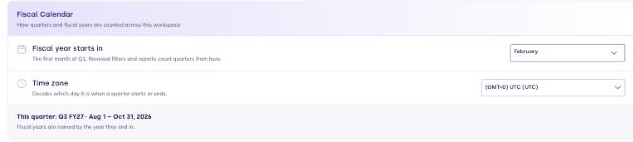
With a February start, the year running February 2026 through January 2027 is FY27. A January (calendar-year) start names the fiscal year by its own year.
Saving a change
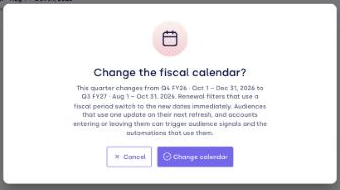
Saving asks you to confirm, because changing the calendar shifts what "this quarter" means everywhere at once. The Change the fiscal calendar? dialog spells out the effect:
- The current quarter changes from the old label to the new one.
- Quarters will start and end at midnight in the chosen time zone.
- Renewal filters that use a fiscal period switch to the new dates immediately. Audiences that use one update on their next refresh — and accounts entering or leaving them can trigger audience signals and the automations that depend on them.
Setting the Fiscal Calendar needs the Configuration permission; it's available to every workspace (there's no separate feature to enable).
Where fiscal periods show up
A period is a named, workspace-relative window — this quarter, next quarter, this fiscal year, and so on — resolved against your calendar at the current moment. The main places they appear:
- Renewal and revenue filters. Renewal presets such as This quarter, Next quarter, and Next 180 days map to fiscal periods. A saved filter stores the period, not fixed dates, so a saved "This quarter" keeps meaning the current quarter as time passes.
- Audiences built on a fiscal renewal period re-resolve whenever they refresh.
- AI reports and assistants. Renari, the chatbot, and agents are given your fiscal calendar as context, so a question like "which accounts renew next quarter" uses your definition of next quarter.
For agents and MCP
FunnelStory's AI is grounded in your fiscal calendar so it doesn't have to guess at dates:
- The MCP
query_semantic_dbtool accepts an optionalperiodargument (a period key such asthis_quarter). When set, FunnelStory resolves it against your calendar and binds the date range into the query. - The workspace profile resource (
file://workspace/profile.json) includes afiscal_calendarobject — the time zone, the current moment, and each fiscal period with its label and date range — so an agent can read your periods and pass a period key rather than computing dates itself.