MySQL
The MySQL connection lets FunnelStory run read-only SQL against your MySQL database to power data models—accounts, users, billing tables, or any view you maintain for analytics.
What FunnelStory uses it for
- Data models — SQL queries in the model builder, validated against your instance, with column mapping to FunnelStory properties.
Before you connect
- Network — Allow inbound access from FunnelStory’s static egress IPs (Allowed IP addresses), or use an SSH tunnel.
- Permissions — Use a user with SELECT only on the schemas or views FunnelStory should read.
Add the connection in FunnelStory
-
Open Configuration → Connections → Add connection, then choose MySQL.
-
Complete the fields in the connection form:
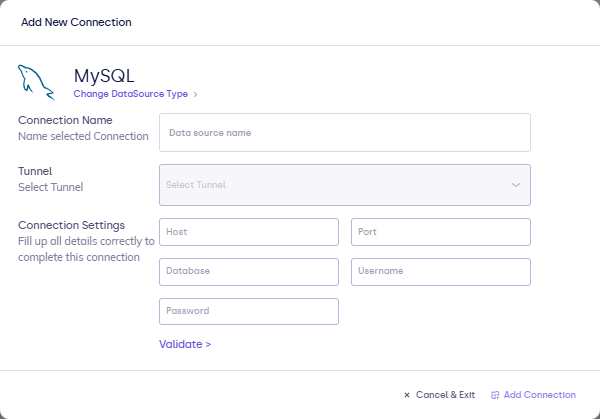
| Field | Description |
|---|---|
| Connection name | Display name in FunnelStory. |
| Host | Server hostname or IP. |
| Port | MySQL port (often 3306). |
| Database | Database name. |
| Username | MySQL user. |
| Password | MySQL password. |
| SSH fields (optional) | If the form offers tunnel parameters; otherwise configure SSH tunnels separately. |
- Click Validate, then Add Connection.
After you connect
Use the connection when configuring models. SQL follows MySQL syntax. See Writing queries for types and timestamps.
Related links
Was this page helpful?