Uploaded documents
The Uploaded documents connection lets you upload your company's own documents directly into FunnelStory, so its AI can search them when reasoning and writing about your product. Reach for it when the knowledge you want agents to use lives in files — runbooks, internal guides, PDFs — rather than on a public documentation site.
Like the Documentation site connection, there are no models to configure: each file becomes a searchable document, not a structured record. If your documentation already lives in a data warehouse, you can bring it in with a Product Docs data model instead.
What FunnelStory uses it for
- AI grounding. Uploaded documents are available to FunnelStory's AI agents and assistants through the workspace's semantic database (as product documentation), alongside anything crawled from a documentation site. See Grounding agents in your product docs for how agents and MCP use it.
Before you connect
- Gather the files you want FunnelStory to read. Supported types are Markdown (
.md,.markdown), plain text (.txt), HTML (.html,.htm), and PDF (.pdf). - Each file must be 50 MB or smaller, and a connection holds up to 1,000 files.
- A file FunnelStory can't read as text — a scanned PDF, for example — is rejected rather than stored, with the note "No text found. If this is a scanned PDF, run OCR on it first." Run OCR on those before uploading.
- Be ready to confirm ownership: you'll acknowledge that these are your company's own documents and that you authorize FunnelStory to read them.
Add the connection in FunnelStory
-
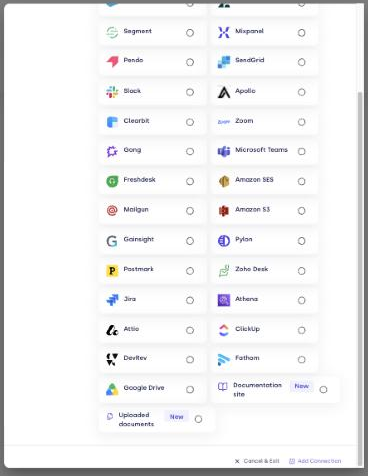
Open Configuration → Connections → Add connection, then choose Uploaded documents from the Applications tab.
-
Give the connection a name, then confirm ownership — "These are our company's own documents, and we authorize FunnelStory to read them."
-
Drag and drop your files, or choose them (you can select several at once). Each readable file is stored whole; PDFs show their page count.
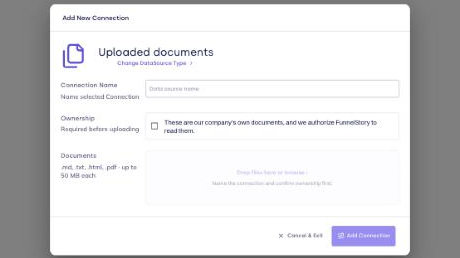
The connection is created when the first file uploads successfully. If you cancel before finishing, FunnelStory discards the half-made connection so nothing is left behind.
Managing the connection
- The connection card shows No files yet or Ready · N files.
- Open the connection to add, replace, or remove files (removing a file asks for confirmation).
- Removing the connection: deleting it doesn't immediately remove the documents it holds; those are purged separately.