Stage conditions
A stage condition is the filter attached to a funnel stage. When filters pass, an account can sit on that stage (subject to the funnel's evaluator rules). Conditions are built with the same structured filter experience used elsewhere in FunnelStory—groups of rules combined with AND / OR logic inside the builder.
What you can filter on depends on the evaluator
In the funnel stage drawer, FunnelStory passes different filter palettes based on the funnel's evaluator:
| Evaluator | Stage filter types (high level) |
|---|---|
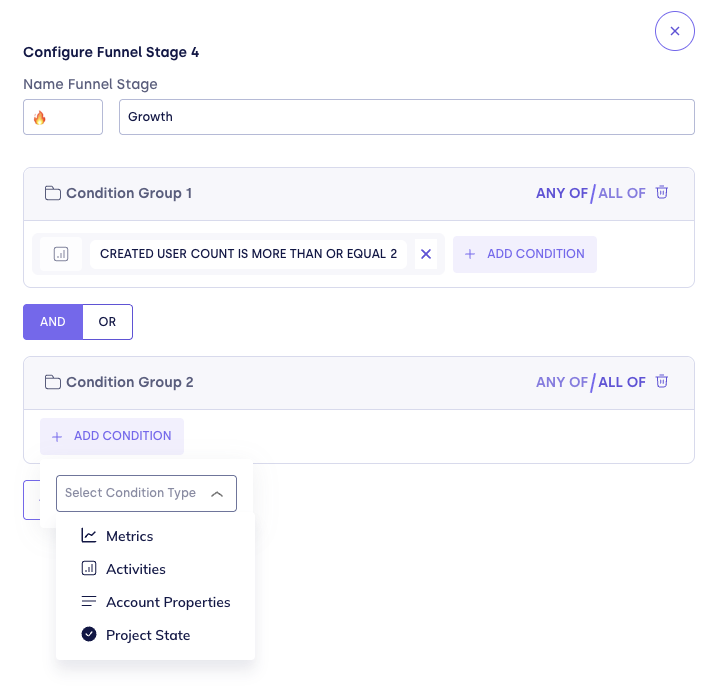
| Timeline | Metrics, activities, account properties, and Project State. |
| Last match | Broader palette aligned with audience-style filters—for example signals, subscriptions, account metrics, health tags, funnel stages / funnel states, and more—plus the timeline-compatible types including Project State. |
Why the split: the Timeline evaluator replays history with stricter semantics; it only consumes filter types that are meaningful for that replay. Last match evaluates the account's current snapshot, so additional dimensions are available.
If you switch evaluators after building filters, revisit each stage: types that are incompatible with Timeline should be removed or simplified so evaluation stays deterministic.
Condition structure
- Groups — Organize rules into AND/OR combinations the way you would for audiences or account list filters.
- Empty stages — A stage with no configured filter conditions does not count as "configured" for readiness checks and does not contribute useful gating.
- Save path — Each stage saves independently via Save Filters in the drawer.
Project State conditions
Project State lets you gate a funnel stage on whether an account has a project of a specific template type that has reached a given state. It is the most common way to link operational project work (onboarding completions, renewals, escalation closures) to funnel progression.
Prerequisites
Before you can add a Project State condition, your workspace needs at least one project template. Templates are workspace-level projects with no linked account—they define a project type (for example "Onboarding" or "Value Generation") that CSMs provision per account. Create them from the Projects page.
Adding a Project State condition
- Open a funnel stage drawer (Configure Funnel Stage).
- Click + Add Condition.
- From the Select Condition Type dropdown, choose Project State.
- Select a project template from the dropdown. Only templates (projects with no linked accounts) appear here.
- Select the state the project must be in:
| Option | State |
|---|---|
| To Do | open |
| In Progress | in_progress |
| Done | completed |
- Click Save Filters.
How it evaluates
The behavior differs by evaluator:
Timeline evaluator — FunnelStory replays project_state_events in chronological order as part of the historical state machine. An account advances past this stage when a project provisioned from the specified template first reaches the required state. Once that event is recorded in history, the stage completion sticks even if the project state later changes. This is ideal for strict sequences ("account must have completed onboarding before reaching Growth").
Last match evaluator — FunnelStory checks whether any project provisioned from the specified template is currently in the required state. The account can move in and out of the stage as the project state changes. This is appropriate when you want the funnel to reflect the account's current operational reality.
Why templates, not individual projects
A Project State condition references a template, not a specific project, because each account gets its own provisioned copy. The template acts as the category (for example "Onboarding")—all provisioned projects from that template are evaluated regardless of what they are named. This also means renaming a provisioned project does not break the funnel condition.
Re-evaluation timing
When a project's state changes—either automatically from task completion or manually—FunnelStory re-evaluates funnel stage placement for the linked accounts immediately, without waiting for the next scheduled funnel refresh. This keeps funnel placement current as project work progresses.
Practical tips
- Start with the minimum rules that truly define "this stage is achieved," then add refinements—dense filters are harder to reason about in Last match and can cause unexpected movement when data changes.
- Align metric windows and activity definitions with how your models refresh so accounts are not stuck waiting for stale inputs.
- When a stage is only for reporting nuance inside a broader step, consider merging steps instead of stacking many near-duplicate filters.
- For Project State with the Timeline evaluator, always provision projects from the correct template before expecting accounts to advance—events are only recorded for projects that have a
source_project_idlinking them to a template.
Related
- Evaluators — timeline vs last match behavior
- Configuring stages — stage editor workflow
- Projects → Templates — creating and managing project templates
- Projects → Provisioning — creating per-account projects from a template
- Platform → Audiences → Filters — similar filter concepts for segments