Review Your Book in Focus Areas
Focus Areas is where a CSM starts the week: it shows your book of business — the accounts assigned to you — with the totals that tell you where the risk is and the action cards that tell you what to do next. This guide is a routine for working through it so nothing important slips. It uses the numbers and filters in order; the Focus Areas reference has the full detail on every control.
Open your book
Sign in and FunnelStory opens Focus Areas on the Book of Business tab, showing the accounts assigned to you. (If you manage a team, you'll also have a Scope picker — see Review Your Team's Book in Focus Areas.)
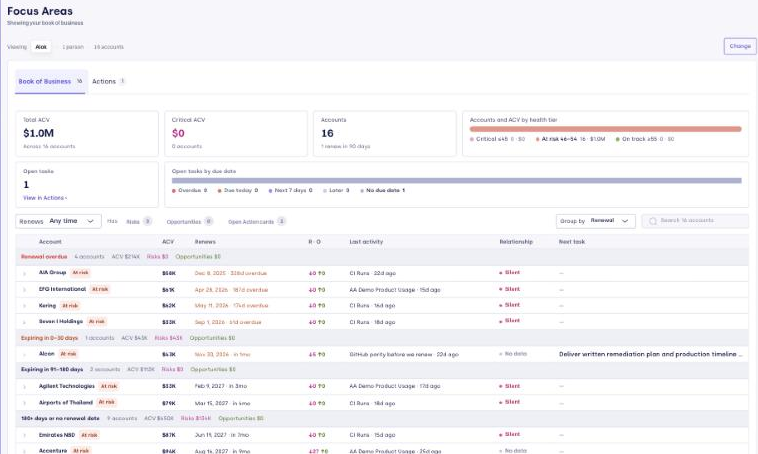
1. Read the summary strip (1 minute)
The strip across the top describes your whole book, not the filtered list. Read it first to see where the pressure is:
- ACV at Risk — contract value in the Critical health tier, and how many accounts. Filter › narrows the list to them.
- Accounts — how many you own, and how many renew in the next 90 days.
- Accounts and ACV by health tier — the split across Critical, At risk, and On track; click a tier to filter the list to it.
- Open tasks by due date — your action cards split into Overdue, Due today, Next 7 days, Later, and No due date. Click one to jump to Actions filtered to it.
If a number looks wrong — ACV at risk is high, tasks are overdue — that's where to start.
2. Triage the accounts (5 minutes)
Work the Book of Business list with Group by and the filters:
- Group by Renewal (the default) to work the soonest renewals first, or Group by Health tier to start with Critical accounts.
- Filter by Renews (0–30, 31–60 days…), by Has risks, opportunities, or open cards, or Search by name. Filters and the tier you clicked in the strip combine.
Scan the columns and act on what stands out:
| If you see… | Do this |
|---|---|
| A Critical or At risk tier chip | Hover or click it to see why — an overdue renewal, the biggest open risks, or a weak relationship |
| Open risks (↓) in the R · O column | Expand the row and read the needle mover |
| A renewal inside 90 days | Make sure it has a plan — open cards, a recent meeting, a clear owner |
| A red or amber Relationship badge | Plan to bring in a second contact; see Relationship maps |
| A Next action card due | Open it and work it (next step) |
3. Work an account without leaving the list
Click a row to expand it into a triage card:

- Active concerns from the Dossier — what's working against the relationship now. Full Dossier › opens the whole thing.
- Tasks — the account's open action cards, soonest first.
- Needle movers — open risks and opportunities; click one to open its Investigation and Triage chat.
- Last meeting — date, sentiment, and who attended.
- + Note — jot a note on the account without leaving the page.
Handle what you can here, and leave the rest as cards to clear on the Actions tab.
4. Clear your action cards (Actions tab)
The Actions tab lists the open action cards across your book. Narrow it with the left panel:
- Due — start with Overdue and Due today.
- Priority, Account (renewing, Critical, has risks/opportunities), and Created by.
Open a card to read its reasoning and drafted outreach, send the email, or mark it done. You can also ask the agent about a card or have it refine the steps and drafts before you act. Cleared cards leave the list.
A weekly rhythm
- Start of week — group by Renewal, work renewals in the next 90 days, then switch to Health tier and clear the Critical accounts.
- Each day — on Actions, clear Overdue and Due today, and glance at the health-tier bar for anything new in Critical.
- Before a call — expand the account's row for its concerns and open items, or follow Prepare for a Customer Call.
Prefer to ask Claude?
With the FunnelStory skills connected, ask "What should I prioritize in my book today?" for a ranked view of the same accounts and cards, or "Give me an account brief for [Account]" for a deeper write-up on anything the list surfaces.
Related
- Focus Areas — the full reference for every control on the page.
- Action Cards — how the cards work, and the per-card Investigate chat.
- Prepare for a Customer Call — the ten-minute pre-call routine.
- Review Your Team's Book in Focus Areas — the manager's version.